Bridge Talk

A ship's voice for Elite Dangerous

Pick one of 28 ready-made voices and your ship starts talking back as you play: docking, jumps, fuel, heat and danger. Or record a voice of your own, one line for every moment.

Free for Windows · waits quietly out of the way · talks, never listens
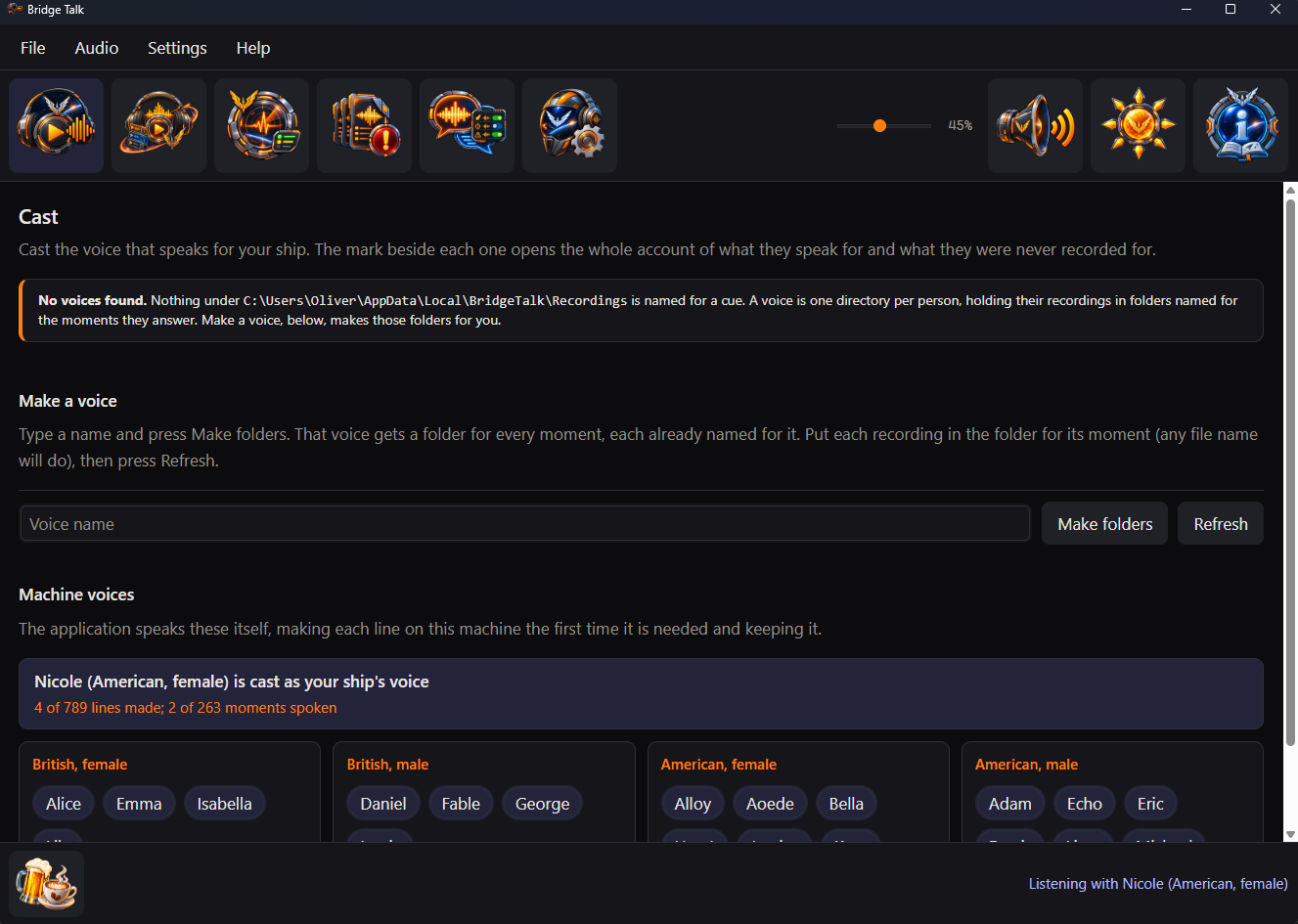
The Cast pane, where a voice is chosen to speak for the ship
Choose a voice on the Cast pane and it speaks for your ship.
Over the comms

What your ship might say

A few of the lines the ready-made voices speak. Every moment has three to choose from.

Docking granted

We're cleared to land, commander.

Arriving in a new system

New system, commander.

Dropping out by a star

Right by the star. Mind the heat.

Reaching a planetary ring

We're in the ring. Watch the rocks.

Running low on fuel

We're running short on fuel, commander.

Coming under fire

Incoming fire, commander.
Ready-made voices

28 voices, ready when you are

No recording needed. Cast any of them and your ship has a voice straight away. Each one is made on your own computer, so nothing ever goes online.

British, female

  • Alice
  • Emma
  • Isabella
  • Lily

British, male

  • Daniel
  • Fable
  • George
  • Lewis

American, female

  • Alloy
  • Aoede
  • Bella
  • Heart
  • Jessica
  • Kore
  • Nicole
  • Nova
  • River
  • Sarah
  • Sky

American, male

  • Adam
  • Echo
  • Eric
  • Fenrir
  • Liam
  • Michael
  • Onyx
  • Puck
  • Santa

Not sure which? Listen to any of them on the Audition pane before you choose.

What it does

A voice that knows the ship

Bridge Talk follows the game while you play and answers each moment worth a word.

🎙️

Ready to go

28 voices, British and American, female and male. Cast one and your ship starts talking.

🎧

Or a voice of your own

Record yourself, a friend or a whole crew. Bridge Talk makes a folder for every moment, already named.

🚀

262 moments

Docking, jumps, supercruise, fuel scooping, overheating, a pirate scanning your cargo, coming under fire and many more.

🚨

Knows what matters

An urgent warning cuts straight in. Everyday updates wait their turn and idle chatter gives way.

💬

Never the same line twice running

Where a voice has more than one line for a moment, it picks a different one from last time.

👂

Hear before you choose

The Audition pane plays any voice, chosen or not, one part of the game at a time.

📋

See what is left to record

The Missing takes pane lists every moment still waiting for a line, with when you will hear it.

🔍

Every silence explained

The Status pane shows what was said and why anything was not, so a quiet ship is never a mystery.

🎚️

Say only what you want

The Chatter pane gives every moment a switch, under twelve categories. Switch one off, a whole category or all of them; station traffic has a switch of its own.

🌙

Out of the way

Put the window away and it keeps talking from the notification area. It can start when you sign in.

🔇

Talks, never listens

No microphone and no voice commands. Mute is one press away whenever you want quiet.

🗂️

Your recordings stay yours

Bridge Talk never changes or removes a recording. Uninstalling leaves every one where it is.

🔒

Nothing goes online

Everything happens on your own computer. No account and nothing sent anywhere.

Alongside other tools

A voice, not a companion suite

EDDI and EDDiscovery are long-standing community tools that can also speak as you play. Bridge Talk does one job: it gives your ship a voice. This is where that makes it different.

Bridge Talk EDDI EDDiscovery
What it is A ship's voice and nothing else A companion that responds to game events, drawing on the game and third-party tools A captain's log with 2D and 3D maps of the galaxy
The voices 28 ready-made voices made on your own computer, with nothing to buy or install Windows text-to-speech voices; more can be bought Speech through its Voice Output Pack add-on
Your own recordings A folder made for every moment; Missing takes lists what is left to record Played from its speech scripts MP3s played on events through its SoundBlaster Pack add-on
Listening Never: no microphone, no voice commands, no VoiceAttack Runs on its own or as a VoiceAttack plugin Voice control through its Free Voice Control pack
Going online Makes no network request of its own Connects to EDSM, Inara and EDDN Connects to EDSM, Inara, Spansh, EDDN and others
Setting it up Cast a voice; there are no scripts to write Speech scripts you can edit Add-on packs for speech, sound and voice control

Bridge Talk only reads the game's journal and status file. Run it beside another tool that speaks and you will hear both. What EDDI and EDDiscovery do is taken from their own pages, which describe far more than this table can.

Record your own

A folder for every moment

You never have to type a moment's name. Bridge Talk makes the folders for you; you fill them.

  1. Name your voiceType a name on the Cast pane and press Make folders.
  2. Record a lineUse any recording program you like, such as Audacity, which is free.
  3. Drop it inSave it in the folder for its moment. A folder can hold several takes.
  4. Press RefreshYour voice appears on the Cast pane, ready to cast.
A look inside

A pane for each job

Cast, Audition, Status, Missing takes, Chatter and Settings sit along the top of the window, with the guide at its far end.

Common questions

Do I have to record anything?

No. Bridge Talk comes with 28 ready-made voices, British and American, female and male. Cast one on the Cast pane and your ship starts talking.

Does it need the internet?

No. The ready-made voices are made on your own computer and Bridge Talk never goes online. The Donate button simply opens your web browser.

Can I use my own voice?

Yes. Type a name on the Cast pane and press Make folders: you get a folder for every moment, already named. Record each line in any program you like, drop it in its folder and press Refresh.

Does it listen to me?

Never. There is no microphone and there are no voice commands. Bridge Talk only speaks.

Will it talk over itself?

Only when it matters. An urgent warning cuts in over anything less important; everyday updates wait their turn and idle chatter gives way. Mute silences it whenever you like.

Can I stop it saying some things?

Yes. The Chatter pane lists all 262 moments under twelve categories, each with a switch. A moment switched off stays quiet whichever voice is cast. Station traffic is a moment of its own, so docking answers and station welcomes can go quiet while other messages are still spoken.

What happens to my recordings if I uninstall?

Nothing. Bridge Talk never changes or removes your recordings, whether you uninstall or not.

Which computers does it run on?

Windows. It installs just for your own account, so it never asks for administrator permission.

Is it free?

Yes. Bridge Talk is free and open source. There is no paid tier and nothing held back behind a donation.

Get Bridge Talk

Download Bridge Talk

One setup program installs everything, the ready-made voices included.

Version 1.2.0
🪟

Windows

For your own Windows account

Download for Windows

Setup program

Windows may show a SmartScreen warning when you run it: here's why.

Run it and choose a Start Menu entry, a Desktop shortcut or starting when you sign in. It installs under your own account unless you pick another folder. A newer one updates it; the same one repairs or uninstalls it.

Support

Supporting Bridge Talk

Bridge Talk is free and stays free. There is no paid tier, no licence key and no feature held back behind a donation. If it has made your ship better company, a contribution supports its maintenance and continued development.