MMSP-native from the ground up, with full compatibility for every major feed format you already use.
MFEED and MMSP native
Parses MFEED (MMSP JSON format) natively. Enforces MMSP/1.0 User-Agent, conditional GET (ETag / Last-Modified) and the 300 s poll floor per the spec. Read the spec →
Feed discovery
Search new feeds by topic through Feedly's public search API, with topic suggestions from Wikipedia as you type, a result cap selector (10 to 200) and bulk subscribe behind a confirmation dialog. Feedly indexes RSS, Atom and podcast sources, so MFEED feeds are added by URL.
Filter expressions
Per-feed MMSP Appendix A ABNF filters, checked as they are saved: one that does not follow the grammar is refused with a message saying what is wrong. The filter dialog surfaces existing terms as toggleable rows: no syntax knowledge required for common cases.
Background polling
Conditional GET with ETag and Last-Modified. Rate-limit backoff, 300 s poll floor. An async asyncio scheduler that wakes every ten seconds and does nothing until a feed is due.
Catppuccin themes
Mocha (dark) and Latte (light) with a single toggle. Theme preference persists across restarts. Amber focus ring on every focusable control.
Full-text rendering
content:encoded preferred over description so full article HTML is shown where available. Media player for podcast and video items built in.
Long content reads itself
The Guide and each licence dialog hold still, descend at reading pace, hold at the end and rewind, so you never have to wheel through one. The URL list shown before a bulk subscribe does the same once it overflows. Touch the surface and it stops, then resumes from where you left it rather than the top.
Full keyboard navigation
Every control reachable without a mouse. Tab wraps cleanly end to end. Space activates throughout and Enter almost everywhere. Left and Right move along both bands of buttons, between sort chips and between dialog footer actions; Up and Down walk a list and the Help menu; Escape closes drawers, dialogs and the Help menu.
Two bands of picture controls
File and view actions along the top, the donation button and the two licences along the foot. Every control is artwork rather than an emoji, so the row looks the same on all three platforms; each carries a tooltip that opens on hover and on keyboard focus alike.
A Guide to every button
The help mark at the right of the header drops a small menu holding the Guide, Check for Updates and About Meridian, since there is no menu bar. The Guide names every button on both bands beside the picture it draws, then explains how often a feed is asked, that a filter hides rather than deletes, what leaves your machine and the keyboard. It opens on its Close button and reads itself down the page.
Import and export
Full subscription round-trip via JSON: each feed comes back with its filter and platform settings as well as its address, type and title. Read state stays where it is. Every import ends in a report of what was added, what you already had and each feed it could not add, with the reason. A neutral examples/feeds_sample.json ships with the repo so you can bootstrap a reading list in seconds.
Bulk feed management
Select-all checkboxes, bulk remove, per-feed filter, edit and delete from the subscription manager. In-place list removal preserves scroll position.
Single-device by design
No account, no sync, no telemetry and no server of ours. Your subscriptions and read state stay on your machine, in one SQLite file. Meridian talks to your feeds, the media they point at, (when you use discovery) Feedly's search and Wikipedia's topic suggestions and GitHub's releases API for the daily update check, which carries no identifier and nothing about you. One thing is worth naming beyond those: playing a YouTube item loads Google's own player in an embedded browser, so a video you watch is visible to Google just as it would be in a browser tab. JSON export and import moves a reading list between machines: the migration path, not live sync.
Updates on your terms
A quiet check against GitHub's releases API at launch and once a day: Download the right file for your platform, Skip This Version for good or Later. Help > Check for Updates asks on demand and reports every outcome. Only a published release can prompt and a failed check on the automatic path says nothing at all.
Architecture
A reference client, built like one
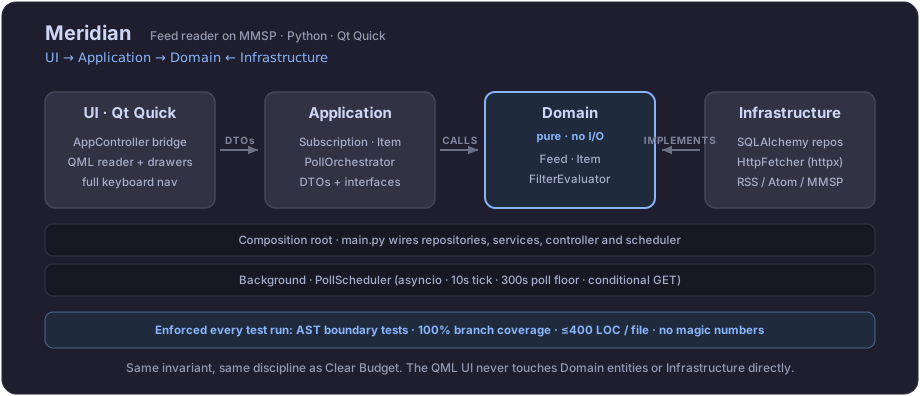
A reference client has to be exemplary or the spec it implements loses authority. So MMSP polling semantics sit behind a pure domain, inside a four-layer architecture, UI to Application to Domain with Infrastructure implementing inward. AST tests and 100% branch coverage are part of every test run, so the behaviour the spec mandates is behaviour the code cannot structurally violate.