
Skills Viewer app icon
Windows · Linux · macOS

The skills you wrote
are invisible.

They sit in directories you rarely open. Claude reads them without ever showing them to you. They accumulate quietly: some written months ago, some arrived with a plugin, most long out of mind. You cannot review what you cannot see. Skills Viewer makes the whole set visible, in one list, on your own machine.
Download GitHub
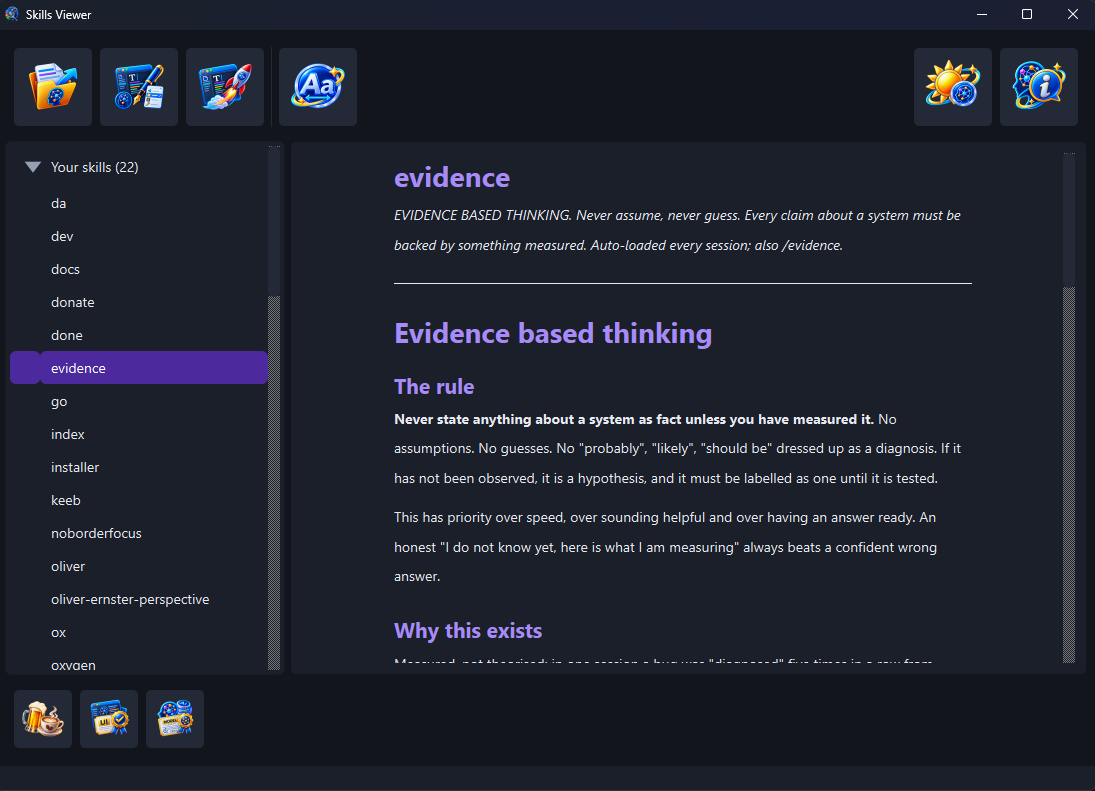
Skills Viewer: the skill library listed on the left, grouped into the skills you wrote and the skills that arrived with a plugin, with the selected skill rendered on the right.

Every skill on the machine in one list, with the one you pick rendered beside it.

All of them
Yours and your plugins'
Read only
Enforced by a test
Local
Nothing leaves the machine
0
Accounts or cloud
GPL + LGPL
Open source

Things you own
but have never read.

A skill library grows the way a drawer fills. Nothing announces itself, nothing asks to be reviewed, so the set that shapes every answer you get is the one set you have never looked at. Skills Viewer opens the drawer.

  • Which skills are actually here. Not which you meant to write: which are on this machine, right now.
  • What each one still says. Rendered to read, with the fields it declares laid out plainly.
  • Whose it is. Skills you wrote and skills that arrived with a plugin are separated under a heading each, so you can tell instantly which is which.
  • What travels with it. The other files sitting beside the document are named, so a multi file skill says so.
  • What is broken. A skill whose frontmatter will not parse is still listed, with the failure shown rather than quietly dropped.
Everything it does
The skill list grouped into your own skills and plugin skills, beside the rendered text of the selected skill.

Your own skills and your plugins' skills, told apart at a glance.

Looking changes nothing.

Skills Viewer never writes to a skill. That is not a promise made in a readme: a structural test reads the whole program and fails the build if any part of it but the settings file calls a writing operation. When you want to change something, it hands the document to the editor you chose and stands back.

Download Features Why it exists

Supporting Skills Viewer

Skills Viewer is free and stays free. There is no paid tier, no licence key and no feature held back behind a donation. If it has shown you something you needed to see, a contribution supports its maintenance and continued development. The same button sits in the window's own bottom tray.

Donate