Fancy Clock app icon
Windows 路 macOS 路 Linux

Fancy Clock

A calm desktop clock that stays out of the way. Analog or digital, with automatic timezone localization, animated skins and adjustable opacity, so the time is always there without ever demanding attention.

Free and open source. Local-first. No account, no telemetry, no cloud.

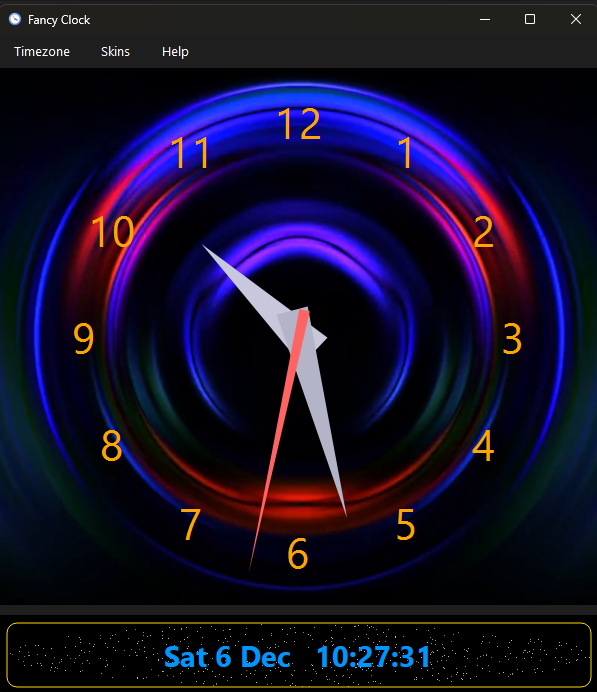
Fancy Clock running on the desktop in analog mode with an animated skin behind the dial
Analog mode with an animated skin behind the dial.

Most desktop clocks are either a bare number in a tray or a heavyweight widget that clutters the screen. Fancy Clock is a clock you actually want on the desktop: frameless, draggable, dimmable, and quietly correct about the time, wherever in the world you are.

What Fancy Clock does

A focused set of things a desktop clock should get right, and nothing it should not.

Analog and digital modes

Switch between a clean sweeping analog dial and a crisp digital readout. The mode you pick is remembered between sessions.

Automatic timezone localization

Reads your system timezone and shows the correct local time, with region and city names translated into your own language.

Accurate to real time

An optional NTP time source keeps the display honest, so the clock is right even when the machine clock has drifted.

Animated video skins

Ten backdrops from a subtle Starfield to a spinning galaxy, koi carp, waves and a wormhole. Or run it plain and quiet.

Adjustable opacity

Dial the window from solid down to a faint ghost, so it can sit over a wallpaper or float above your work without getting in the way.

Frameless and draggable

No title bar, no chrome. Grab it anywhere and place it exactly where you want it on any monitor. A single instance, never a stack of windows.

Ten skins, one clock

Pick a mood. Every skin sits behind the same clear dial, and your choice is saved.

Starfield

Mesmerize

Spinning Galaxy

Wormhole

Koi Carp

Waves

Spiral

Spiral Clock

Flower Tunnel

Fancy Circles

Speaks your language

The interface and the timezone names are translated across more than 70 languages and over 240 regional locales, from Arabic and Bengali to Vietnamese and Welsh. Numbers follow your locale too. Fancy Clock picks the right one from your system automatically, and you can override it whenever you like.

Why it exists

A clock on a desktop has one job, and most of them do it either too loudly or not at all. A tray digit is easy to miss; a busy widget is easy to resent. Neither is calm.

Fancy Clock is built around staying present without being noisy. It is frameless so it blends in, dimmable so it never competes with your work, and correct about the time and the timezone so you can trust a glance instead of a double-check.

It is the clock I wanted on my own desktop: something pleasant to look at, honest about the time, and happy to fade into the background until the moment I need it.

Frequently asked questions

Is Fancy Clock free?

Yes. Fancy Clock is free and open source, released under the GNU LGPL-3.0 licence.

Does Fancy Clock work offline?

Yes. It is local-first and runs entirely offline. The only optional network use is fetching accurate time from an NTP server, which you can leave off.

Which platforms does Fancy Clock run on?

Windows, macOS and Linux, from a single PySide6 codebase. Windows ships as an executable, and Linux is available as a Flatpak.

Can I make the clock semi-transparent or keep it out of the way?

Yes. The window is frameless and draggable, and its opacity is adjustable from fully solid down to a faint overlay, so it can sit unobtrusively over anything.

Does it handle different timezones and languages?

Yes. Fancy Clock detects your system timezone and language, shows the correct local time, and translates region names and numbers across more than 70 languages and 240 regional locales.

Runs everywhere, stores nothing remotely

One PySide6 codebase, native on all three platforms. Nothing about you ever leaves the machine.

Windows

Standalone executable

macOS

From source

Linux

Flatpak

Get FancyClock

Download FancyClock

Pick your platform and you have the newest release. Free and open source under the LGPL-3.0 licence, local-first with no account, no telemetry and no cloud.

Latest release
馃獰

Windows

Windows 10 or 11, 64-bit

Download for Windows

Portable executable (.exe)

No installer: save it anywhere and run it.

馃惂

Linux

Any distribution with Flatpak

Download for Linux

Flatpak bundle (.flatpak)

Install with flatpak install FancyClock.flatpak.

Fancy Clock is a free, private, local-first desktop clock for Windows, macOS and Linux. It offers analog and digital modes, automatic system timezone localization with region names and numbers translated across more than 70 languages and 240 regional locales, optional NTP time accuracy, ten animated video skins including Starfield, adjustable window opacity and a frameless draggable window. Built with Python and PySide6, it runs entirely offline with no cloud dependency, and is open source under the LGPL-3.0 licence.