What it is
A small, self-contained example of wiring a REST API to a React front end.
Three lifts, per-floor service
Each elevator services its own configured set of floors, read from the backend on load.
Two ways to call a lift
Pick a floor and let the panel choose the nearest servicing lift. You can also drive a specific elevator directly.
Live-ish status
The panel polls elevator status once a second and animates the car stepping between floors.
Clean REST surface
Three JSON endpoints for configuration, status and floor requests, backed by SQLite.
Why this exists
A learning project, kept public on purpose.
This was built as a deliberate exercise: a first serious run at React, wired against a Django REST backend, at a time when my front-end skillset was primitive. An elevator panel is a good teaching problem because the whole thing is state: cars, floors, destinations and direction all have to stay consistent while requests arrive from two different surfaces.
It stays published because it still demonstrates the shape of a conventional full-stack split done cleanly: three JSON endpoints, one polling front end, a one-way boundary and an honest list of what it is not. Not everything in a portfolio needs to be a flagship; some of it should show where the range started.
What it is not
- Not deployed and not production software. It runs on your own machine only: the backend on 127.0.0.1:8000 and the front end on localhost:3000.
- Not connected to any real elevator hardware. The lifts are rows in a local SQLite database; nothing physical moves.
- The dispatch logic is deliberately simple. The "quickest lift" is just the nearest servicing car by floor distance, not a real scheduling algorithm.
- It ships in Django development mode (debug on, a sample secret key, hard-coded localhost origins). It is not hardened for public hosting.
This page is an overview only. It cannot run the app, because the React front end needs the Django backend running on your machine. Follow the steps below to try it.
How it behaves
A single-screen panel, no build tooling beyond Create React App.
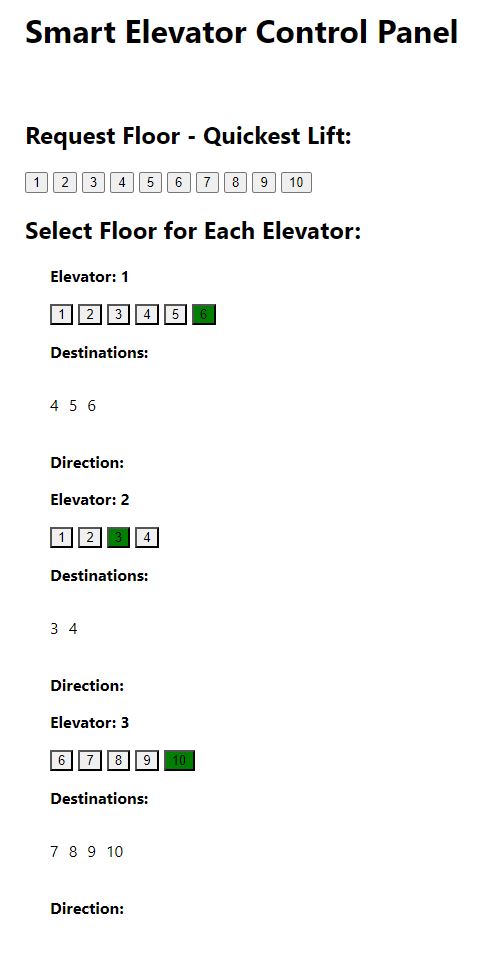
The top row requests a floor from whichever servicing lift is closest. Below it, each elevator has its own floor buttons and shows its current destinations and travel direction.
Buttons highlight amber while a car passes a floor and green on arrival, driven by the once-a-second status poll.
API endpoints
Served by Django REST Framework at http://127.0.0.1:8000.
| Method | Path | Purpose |
|---|---|---|
| GET | /api/lift/config/ |
The serviced floors for each elevator. |
| GET | /api/lift/status/ |
Current floor and destinations for every elevator. |
| POST | /api/lift/request/ |
Request an elevator to a target floor. |
The Django admin and the browsable DRF views are also reachable while the server runs, so you can inspect the data directly.
Architecture
A conventional two-process split, talking over HTTP and JSON.
Front end
React (Create React App) with axios. A single control-panel component holds state and polls the backend.
Back end
Django REST Framework class-based views over Django ORM models, serialized to JSON.
Data
A local SQLite file holds the elevators, their serviced floors and current destinations.
Boundary
CORS is restricted to the local React origin; requests flow one way, from panel to API.
Run it locally
Two terminals: one for the API, one for the React app.
- Backend: create and activate a virtual environment, then install the API requirements.
- Start Django on 127.0.0.1:8000.
- Front end: install the npm dependencies in a second terminal.
- Start React and open http://localhost:3000.
# Terminal 1 - Django REST backend
cd elevator_api
pip install -r requirements.txt
python manage.py runserver

# Terminal 2 - React control panel
cd elevator-control-panel
npm install
npm start
First run needs the database migrations applied (python manage.py migrate) and the elevator records populated. See the repository for details.
Tech stack
Standard, boring, dependable pieces.